


Types of Wire and Cable Used in Data Communications
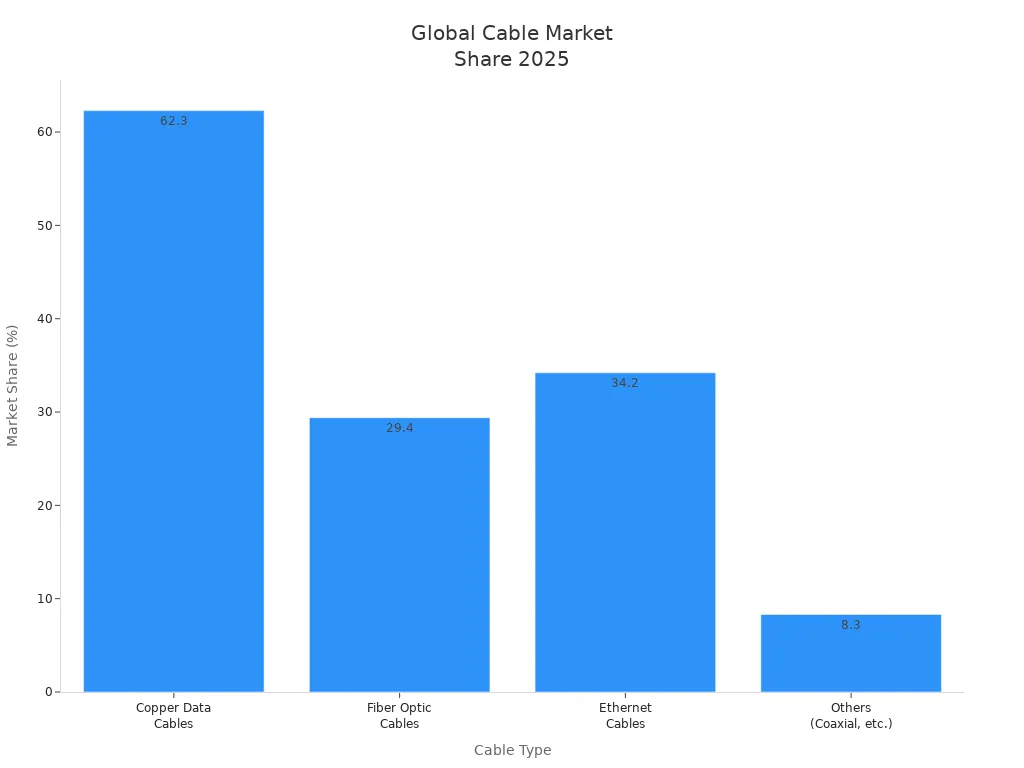
2026-05-13 10:53You can find many main types of wire and cable in data communications. These types are twisted pair, coaxial, fiber optic, data/ethernet, multiconductor flat, and specialty cables. Each type is good for different jobs. For example, twisted pair cables are used for Ethernet and network cabling. Coaxial cables are used in broadband, broadcasting, and factories. Fiber optic cables send fast data over long distances. Data and ethernet cables are used in most data centers. Multiconductor flat cables help keep things neat and small. Specialty cables are made for special or tough places.
| Cable Type | Market Share (2025) | Common Applications |
|---|---|---|
| Copper Data Cables | 62.3% | Ethernet, network cabling |
| Fiber Optic Cables | 29.4% | Backbone, FTTH, data centers |
| Ethernet Cables | 34.2% (revenue) | Enterprise, automation, PoE |
| Others (Coaxial, etc.) | 8.3% | Broadcasting, specialty uses |
Picking the right wire and cable helps you get better results and fewer problems. Xiamen Evershine Electronic Technology Co., Ltd. is a trusted company. They give good advice to help you choose what you need.
Key Takeaways
Pick the right cable for what you need. Twisted pair cables work well in homes. Fiber optic cables are fast and go far.
Learn how cable types are different. Twisted pair is cheap for short spaces. Coaxial keeps signals steady. Fiber optic gives lots of data.
Think about electromagnetic interference (EMI) when picking cables. Use shielded twisted pair (STP) in loud places. This helps keep your data safe.
Plan your cable setup with care. Think about speed, distance, and noise. This helps your network work well.
Ask experts like Xiamen Evershine for help. They can help you pick the best cables for your needs.
Twisted Pair Wire and Cable
Twisted pair cables are one of the most common types of wire and cable used in data communications. You see them in homes, schools, and offices. These cables have two insulated copper wires twisted together. The twisting helps block outside noise and keeps your data safe.
UTP (Unshielded Twisted Pair)
UTP stands for Unshielded Twisted Pair. You find UTP cables in many networks because they are flexible and cost less than other types. UTP cables do not have extra shielding. This makes them easy to install and bend around corners. You can use UTP cables for voice, video, and data signals. However, they can pick up more electromagnetic interference (EMI) from nearby devices.
UTP cables lack shielding, so they are lighter and easier to handle.
They cost less and work well in places with low interference.
You often see UTP cables in homes, small offices, and classrooms.
STP (Shielded Twisted Pair)
STP stands for Shielded Twisted Pair. These cables have a special shield around the wires. The shield can be a foil or a braided mesh. This extra layer protects the signals inside the cable. STP cables are a good choice when you need strong data signals and fewer errors.
STP cables include shielding, which blocks outside noise and reduces crosstalk.
The shield helps keep your data accurate and reliable.
You use STP cables in places with lots of machines or electrical equipment.
EMI Reduction Features
Electromagnetic interference (EMI) can cause problems in your network. UTP cables do not have shielding, so they can pick up more EMI. STP cables have a shield that reflects and absorbs unwanted signals. The shield sends this energy to the ground, keeping your data safe.
Tip: If you work in a factory or near heavy machines, choose STP cables for better protection against EMI.
STP cables use foil shields to block high-frequency noise and braided shields to stop lower-frequency signals. You must connect the shield properly. If you do not, the shield can act like an antenna and make things worse.
Common Applications
You use twisted pair wire and cable in many places. Here are some examples:
Home and office networks
Telephone lines
Security camera systems
Data centers
Industrial settings
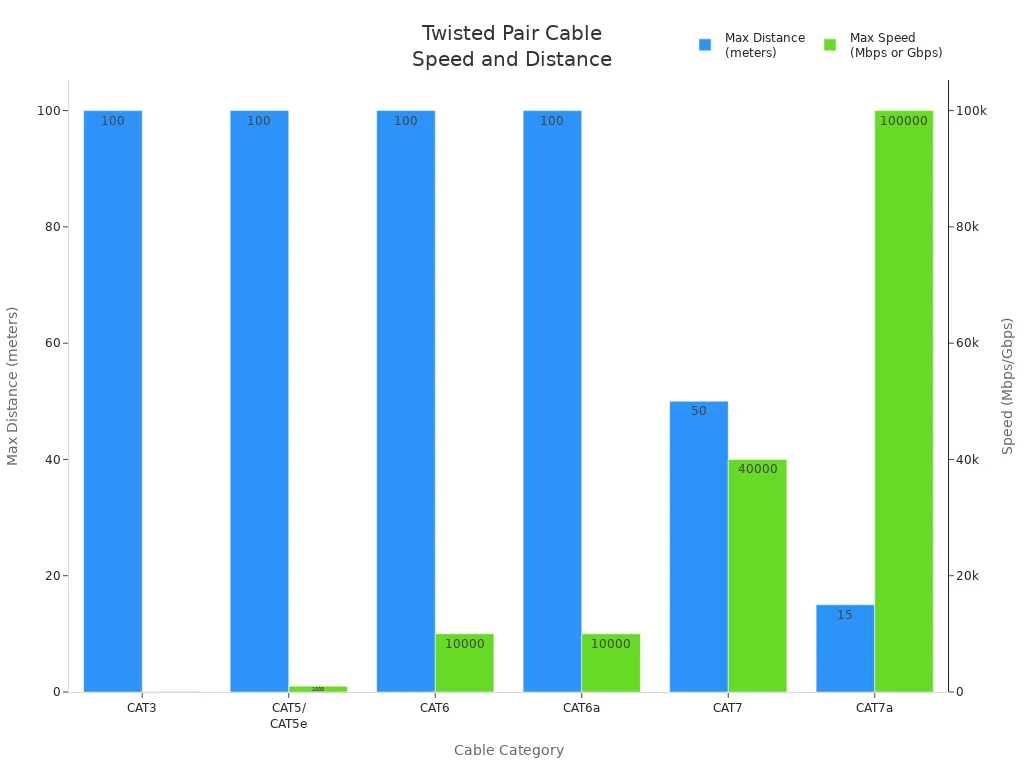
You can find different categories of twisted pair cables. Each category supports different speeds and distances. The table below shows some common types:
| Cable Category | Maximum Distance | Data Transmission Speed |
|---|---|---|
| CAT3 | 100 meters | 10 to 100 Mbps |
| CAT5/CAT5e | 100 meters | Up to 1000 Mbps |
| CAT6 | 100 meters | 1 Gbps (up to 100m), 10 Gbps (37-55m) |
| CAT6a | 100 meters | 10 Gbps |
| CAT7 | 50 meters | Up to 40 Gbps |
| CAT7a | 15 meters | Up to 100 Gbps |
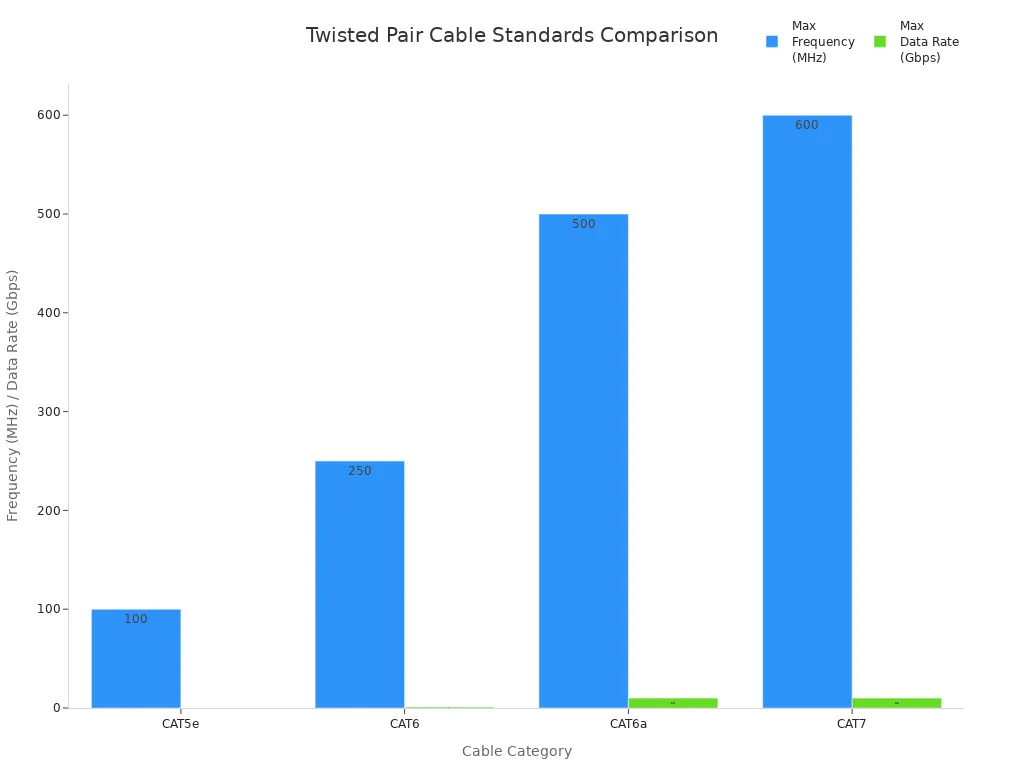
You can also look at the standards for twisted pair cables:
| Category | Maximum Frequency | Data Rate | Distance |
|---|---|---|---|
| CAT5e | 100 MHz | 100 Mbps | 100 m |
| CAT6 | 250 MHz | 1 Gbps | 100 m |
| CAT6a | 500 MHz | 10 Gbps | 328 ft |
| CAT7 | 600 MHz | 10 Gbps | 100 m |
You often see twisted pair cables in wire harnesses for data communications. If you need a Wire Harness or Automotive Wiring Harness, you can find products that use twisted pair wire and cable for reliable connections.
Twisted pair wire and cable give you a balance of speed, distance, and cost. You can choose UTP for simple jobs or STP for tough environments. This helps you build a network that works well and lasts a long time.
Coaxial Wire and Cable
Structure Overview
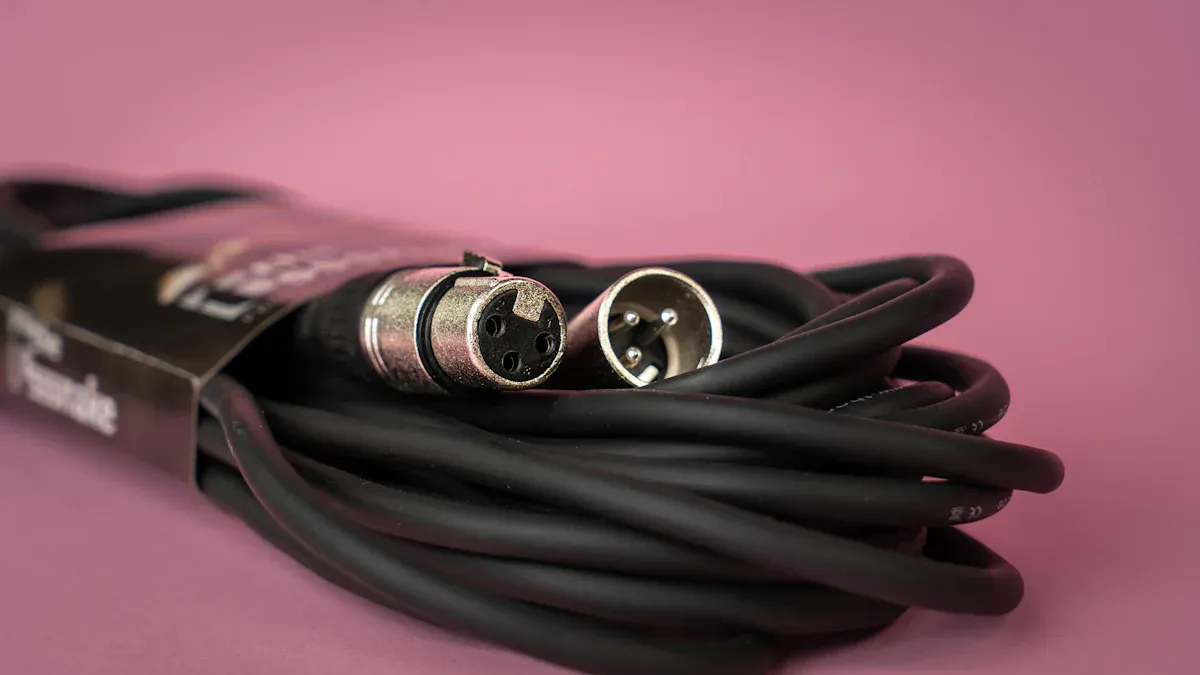
Coaxial cables are used in many data systems. They have a special design. Inside, there is a copper wire. Around it, you see an insulating layer. Next, a metal shield covers the insulation. A tough jacket wraps everything on the outside. This setup helps coaxial cables send signals with less noise. The shield keeps outside sounds away. Your signal stays strong and clear.
High-Frequency Signal Transmission
Coaxial cables are good for high-frequency signals. Some types work up to 3 GHz. The table below shows how coaxial cables compare to others:
| Cable Type | Max Frequency | Bandwidth |
|---|---|---|
| Coaxial (RG-6) | ~3 GHz | Up to 750 MHz |
| Coaxial (RG-59) | ~1 GHz | Up to 750 MHz |
| Coaxial (RG-11) | ~3 GHz | Up to 750 MHz |
| Twisted Pair | Up to 10 Gbps | Up to 4700 MHz |
| Fiber Optic | 10/100/1000 Mbps, 10/40/100/200 Gbps | Up to 4700 MHz |
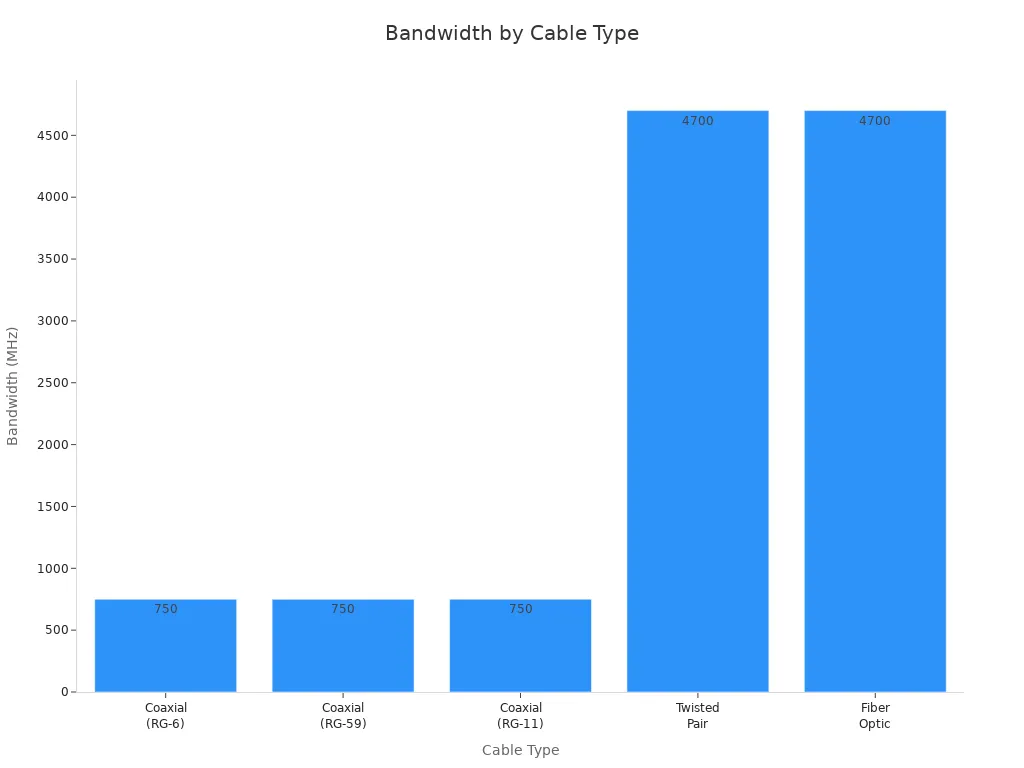
You get steady signals for TV, internet, and video. The shield lets you use longer cables without losing quality.
Typical Uses
Coaxial cables are used in many ways. Here are some examples:
| Application Type | Description |
|---|---|
| TV | Sends cable television signals. |
| Phone | Used for phone calls. |
| Broadband connections | Gives fast internet access. |
| Video | Sends video signals clearly. |
| DS3 | Moves data fast for phones. |
| DS4/NA | Sends radio and TV far away. |
| RG11 | Sends TV and camera signals. |
| RG59 | Old way for audio and video. |
| RG6 | Better than RG59 for new uses. |
You can find coaxial cables in Cable Assembly and Wire and Accessories. These help you build your network. Cable Assembly and Wire and Accessories make setup simple and strong.
Strengths and Limitations
Coaxial cables protect against outside noise. The shield and insulation keep signals safe. You can use them for longer runs than some other copper wires. Here are some main points:
Coaxial cables use copper to carry signals.
The shield stops outside noise from getting in.
You can send TV, phone, and data signals.
Fiber optic cables are faster and can carry more data.
Note: Coaxial cables are good for many jobs, but fiber optic cables are best for super fast or very long connections.
You can trust coaxial wire and cable for many daily uses. They give you clear and steady signals.
Fiber Optic Wire and Cable
Fiber optic cables use light to send data. You can move information very fast and over long distances. These cables have a glass or plastic core. Light travels through the core and carries your data. You see fiber optic cables in many modern networks. They help you get high-speed internet, clear phone calls, and fast video streaming.
Single-mode Fiber
Single-mode fiber has a very thin core. The core is about 9 microns wide. You use single-mode fiber when you need to send data far away. Light travels straight down the core. This means you get less signal loss and more bandwidth. You can connect buildings, cities, or even countries with single-mode fiber.
| Fiber Type | Core Diameter | Transmission Characteristics |
|---|---|---|
| Single-mode | 9 microns | Longer distance, higher bandwidth |
| Multi-mode | 50-62.5 microns | Shorter distance, lower bandwidth |
Tip: Choose single-mode fiber if you want to build a network that covers long distances or supports very high speeds.
Multi-mode Fiber
Multi-mode fiber has a wider core. The core size is usually 50 to 62.5 microns. You use multi-mode fiber for shorter distances. Light bounces inside the core and takes many paths. This can cause signal loss over long runs. Multi-mode fiber works well in buildings, schools, and data centers.
Multi-mode fiber is easier to install than single-mode fiber.
You can use it for local networks and short connections.
It costs less than single-mode fiber for short distances.
Bandwidth and Distance Benefits
Fiber optic cables give you big advantages over copper cables. You get much higher speeds and longer distances. You can send data at 100 Gbps or more. Copper cables can only reach about 100 meters before the signal gets weak. Fiber optic cables can go several kilometers without losing quality.
| Cable Type | Maximum Bandwidth | Maximum Transmission Distance |
|---|---|---|
| Fiber Optic | Over 100 THz | Several kilometers (up to 80 km and beyond) |
| Copper | Up to 10 Gbps | Typically limited to 100 meters |
Fiber optic cables can carry up to 1,000 times more data than copper cables.
You can reach speeds of 100 Gbps and beyond with fiber optic cables.
Fiber optic cables work well over long distances, while copper cables lose signal quickly.
Note: Fiber optic cables are fragile and need careful handling. They cost more than twisted pair or coaxial cables. You may need special tools and training to install them.
Common Scenarios
You should use fiber optic cables in these situations:
| Scenario Type | Description |
|---|---|
| Long-distance connections | Best for links over 100 meters. |
| High-bandwidth applications | Needed for speeds of 40Gbps, 100Gbps, and more. |
| Future proofing | Good if you want to upgrade your network later. |
| High EMI environments | Works well where there is a lot of electromagnetic noise. |
| Energy-efficient data centers | Helps save energy in large data centers. |
Fiber optic cables are perfect for connecting buildings or campuses.
You can use them in places with lots of machines or radio signals.
They help you build networks that last for many years.
Alert: Fiber optic cables are thin and can break easily. You must handle them with care during installation and maintenance. The cost is higher, but you get better performance and reliability.
If you want the best speed and distance for your network, fiber optic wire and cable is the top choice. You can ask experts for help to pick the right type for your needs.
Data, Ethernet, and Multiconductor Flat Cables
Data and Ethernet Cable Types
Data and ethernet cables connect computers and network devices. These cables help you send information fast and safely. Each cable type has its own speed and best use. The table below shows the main types used in big networks:
| Cable Category | Maximum Speed | Bandwidth | Max Distance | Best For |
|---|---|---|---|---|
| Cat6a | 10 Gbps | 500 MHz | 100 meters | Enterprise networks |
| Cat7 | 10-40 Gbps | 600 MHz | 100 meters | Data centers, high-performance computing |
| Cat7a | 40 Gbps | 1000 MHz | 50 meters | High-performance computing environments |
| Cat8 | 25-40 Gbps | 2000 MHz | 30 meters | Server rooms, data centers |
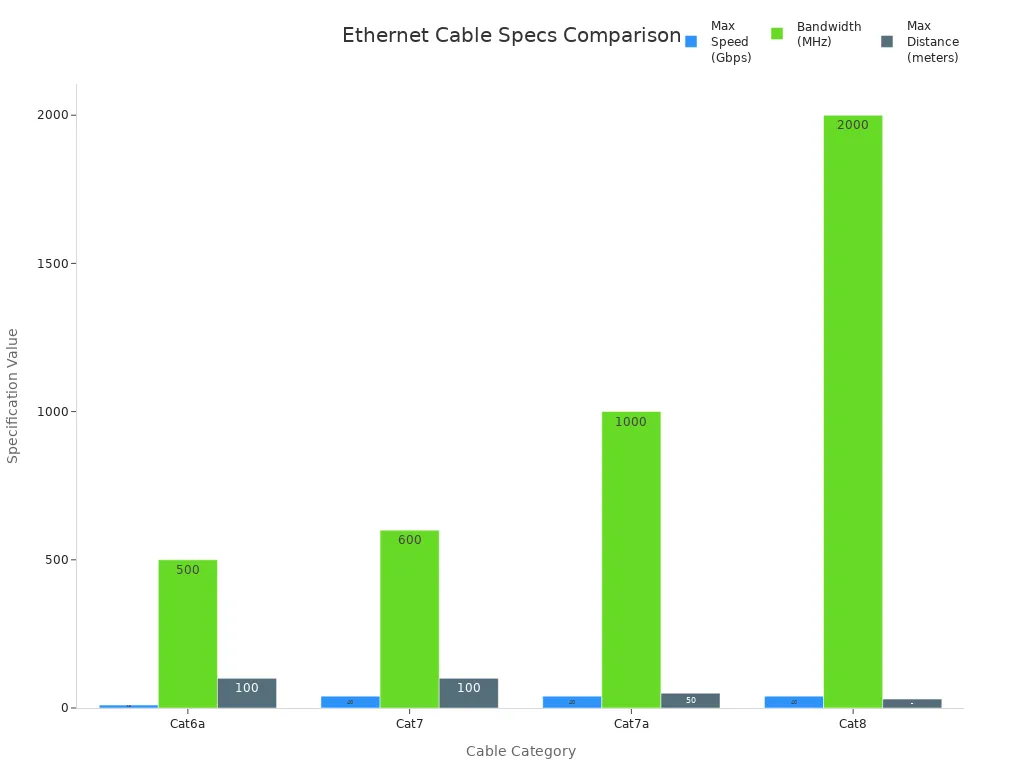
Pick your cable by how fast and how far you need to go. Cat8 is best for short, super-fast links in server rooms.
Tip: Cat6a or Cat7 is good for most offices. They give you a nice balance of speed and distance.
Multiconductor Flat Cable Features
Multiconductor flat cables, like ribbon cables, have many wires in a row. Each wire is covered with its own insulation. This makes the cable bend easily and fit in small spaces. You often see these cables inside computers and medical machines. The flat shape keeps wires neat and tidy.
Screened vs. Unscreened Variants
You can choose screened (shielded) or unscreened (unshielded) cables. Screened cables have a shield to block outside noise. Unscreened cables do not have this shield. The table below shows the main differences:
| Type of Cable | Advantages | Disadvantages |
|---|---|---|
| Shielded Cat6 | Better protection against EMI, suitable for high-interference environments, maintains stronger signal over long distances | Higher cost, increased thickness and weight, more complex installation due to grounding requirements |
| Unshielded Cat6 | More flexible, cost-effective in low-EMI settings | Less protection against EMI, potential for crosstalk in high-interference environments |
Note: Use shielded cables if you work near machines or strong electrical signals.
Application Examples
You can find these cables in many places:
Speaker cables
Coaxial cables
Cat 5, Cat 5e, and Cat 6 for LAN and Ethernet
Telephone cables
Medical electronics
Computers and digital devices
Communications technology
Audio and sound systems
On-machine controls
Instrumentation and control panels
Wire harnesses and cable assemblies
Data transmission tools
Security and alarm systems
Remote control circuits
Actuator controls
Low-voltage power supplies
You can learn more about Electrical Wire and Cables and Charging Cable for your data and power needs. These products help you build strong and safe systems for many uses.
Specialty Cables
Specialty cables are used when regular cables do not work. You use them for special jobs in data communication. These cables can handle tough places or connect special devices. Some can also move data very fast.
Direct Attach Cables (DAC)
Direct Attach Cables, called DACs, link network equipment in data centers. You use DACs for short distances, less than 7 meters. They have copper wires inside and connectors on both ends. You do not need extra plugs or adapters. DACs give fast speeds and low delay. You see them in server rooms where devices are close together.
Tip: Pick DACs if you want a simple and cheap way to connect devices in racks.
Twinax Cables
Twinax cables look like coaxial cables but have two wires inside. You use twinax for high-speed data in storage networks or between switches. Twinax works well for short runs. They block outside noise and keep your data safe. Many new data centers use twinax cables.
Other Specialty Types
There are many other specialty cables for special jobs. Industrial Ethernet cables work in harsh places. They can handle heat, cold, and shaking. Some specialty cables connect medical machines or robots in factories. You also use AC Power Cord in data setups. This cord gives power to network devices. You can find AC Power Cord options here.
Brief Descriptions and Uses
You pick specialty cables for their special features. Copper cables help you upgrade old systems and connect devices easily. Fiber optic cables give high bandwidth and work over long distances. Industrial Ethernet cables work in tough places and block interference. Specialty cables help you build safe and strong networks in factories, hospitals, and data centers.
Use DACs for fast, short links in server racks.
Pick twinax for high-speed links between switches.
Choose industrial Ethernet for rough places.
Select fiber optic for long-distance, fast needs.
Specialty cables help you finish your wire and cable choices. They solve problems that regular cables cannot.
Wire and Cable Comparison
Key Differences
There are big differences between twisted pair, coaxial, fiber optic, and specialty cables. The table below shows how they are not the same:
| Characteristics | Twisted Pair Cable | Coaxial Cable | Optical Fiber Cable |
|---|---|---|---|
| Signal Transmission | Electrical over copper | Electrical over conductor | Optical over glass fiber |
| Bandwidth | Low | Moderately high | Very high |
| Distance | Short | Longer | Very long |
| Interference | Susceptible to EMI | Resistant to EMI | Immune to EMI |
| Security | Less secure | Less secure | Highly secure |
Twisted pair cables use copper wires for sending signals. They work best for short distances. Coaxial cables have a shield that blocks noise. They can send signals farther than twisted pair. Fiber optic cables use light to move data. They are the fastest and can go the longest distance.
Advantages
Each cable type has its own good points. You can use this list to help you pick the right cable:
Twisted pair cables are cheap and easy to bend. They are good for home networks and phones.
Coaxial cables give steady signals and block outside noise. You see them in TV and internet setups.
Fiber optic cables move data very fast and go far. They are best for big networks.
Specialty cables, like Cat7 or Cat8, are great for places that need high speed or extra protection.
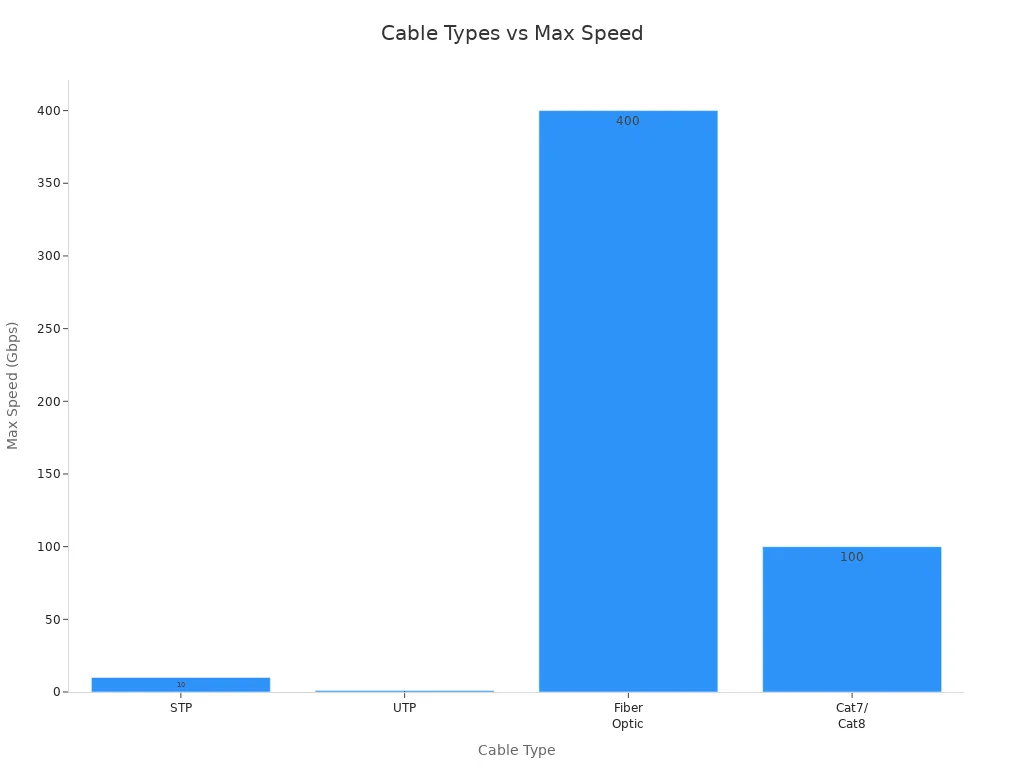
Tip: If you want the fastest speed and best results, pick fiber optic cables. For simple jobs, twisted pair or coaxial cables are good choices.
Best Use Cases
You can pick the right wire and cable by thinking about where you will use them:
| Type | Best Use Cases |
|---|---|
| Cat5e | Homes, small offices, basic internet |
| Cat6/Cat6A | Large networks, data centers, smart buildings |
| Coaxial | TV, broadband, radio, video |
| Fiber Optic | Military, data centers, long-distance connections |
| Specialty | Factories, hospitals, high-speed server rooms |
Use twisted pair for phones and local networks.
Pick coaxial for TV and video.
Choose fiber optic for fast, long links.
Try specialty cables for tough jobs or special machines.
Now you can compare wire and cable types. This helps you pick the best one for your project.
You now know the main types of wire and cable. You also know where each type works best. When you pick a cable, think about a few things. First, think about how fast your network needs to be. Next, look at where you will put the cable and if there is any interference. You should also check how long the cable needs to be and if the signal might get weak. Make sure you follow fire codes and safety rules. Do not make mistakes like using the wrong cable or forgetting about shielding. Always check if the cable is good quality and works with your devices. Use the comparison section to help you choose the best cable for your needs. If you need more help, ask Xiamen Evershine Electronic Technology Co., Ltd. They can help you find the right products.
FAQ
What cable should you use for home internet?
Cat5e or Cat6 twisted pair cables are best. These cables let you stream and play games fast. They are simple to put in. They cost less than other cables.
How do you reduce interference in your network cables?
Pick shielded cables like STP or fiber optic cables. Shielding stops outside noise. Keep cables away from power lines and big machines.
Can you use fiber optic cables outside?
You can use fiber optic cables outdoors. Pick cables with a strong jacket. The jacket keeps water, sunlight, and animals out.
When do you need specialty cables?
Use specialty cables in tough places or for special devices. For example, use industrial Ethernet in factories. Use DACs in data centers. Specialty cables fix problems regular cables cannot.