

what is a usb c cable look like?
2025-12-05 10:27When you pick up a usb c cable, you’ll notice its small, oval connector. It looks the same on both sides, so you never have to worry about which way to plug it in. This reversible design makes it stand out from older cables. Almost every new phone or laptop uses this type now, thanks to its easy-to-use shape and smooth, compact look.
Key Takeaways
USB C cables have a small, oval-shaped connector. It is easy to spot. The connector can be plugged in either way. This saves you time and stops you from getting annoyed. USB C cables are small and easy to carry. They fit many different devices. You can find them in black, white, or bright colors. Pick a color to match your style. Some cables use strong materials like braided nylon. This makes them last longer and feel nice. USB C cables work with many new devices. Older USB types do not work with as many things. Always check what the cable can do. Not every USB C cable lets you move data. Buy cables from brands you trust. This helps keep your devices safe and working well.
1. USB C Cable Shape
Oval Design
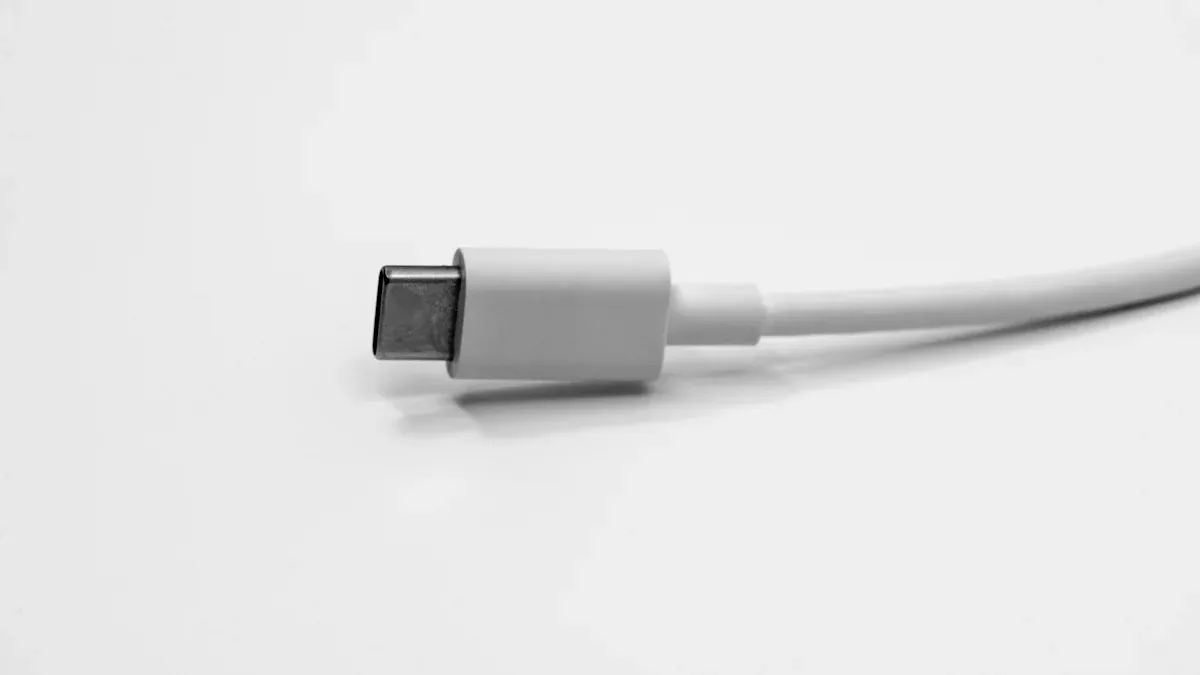
When you look at a usb c cable, the first thing you’ll notice is its unique oval shape. This design stands out from the old, blocky USB connectors you might remember. Instead of sharp corners or a boxy look, the usb c cable connector has smooth, rounded edges. This makes it easy to spot in a pile of cords.
Here’s a quick comparison to help you see the difference:
You can see that the oval shape is not just for looks. It helps you plug in your devices faster and with less hassle. Many people find the usb c cable easier to use because of this simple change.
Symmetry
One of the coolest things about the usb c cable is its symmetry. Both sides of the connector look exactly the same. You don’t have to check which side is up or down. Just grab the cable and plug it in. This design makes life easier, especially when you’re in a hurry or plugging in your device in the dark.
You can insert the usb c cable either way—no more flipping it over and over.
The symmetrical shape also helps prevent damage. Older USB types could bend or break if you tried to force them in the wrong way. With usb c cable, that problem is gone.
Tip: If you ever get frustrated with other cables, remember that the symmetry of usb c cable is there to save you time and trouble.
Compact Size
The usb c cable is small but mighty. Its connector measures about 8.94 millimeters wide and just over 3 millimeters tall. That’s much smaller than the old USB A connectors. This compact size means you can use the same cable for everything from tiny phones to big laptops.
The small size makes the usb c cable easy to carry in your bag or pocket.
You don’t need to bring lots of different cables for different devices.
Many modern gadgets use usb c cable because it fits even in slim, lightweight designs.
The compact design also means you can connect your devices without bulky plugs getting in the way. Whether you’re charging your phone or transferring files, the usb c cable keeps things neat and simple.
If you’re looking for a reliable usb c cable, you might notice brands like Xiamen Evershine Electronic Technology or other usb data cable manufacturers. They often highlight the shape and size of their cables because these features make a real difference in everyday use.
2. Reversible Connector
Double-Sided Plug
Have you ever tried plugging in a cable and realized it just won’t fit? You flip it over, try again, and still struggle. That’s a common problem with older USB types like USB-A and Micro USB. With a usb c cable, you don’t have to deal with that hassle. The connector features a double-sided plug, so you can insert it either way. No more guessing or flipping the cable around.
You grab the cable.
You plug it in.
It works, every time.
This simple change makes a big difference. The symmetrical design of the usb c cable means you never have to check for the “right side.” You save time and avoid frustration. Many people say this is their favorite feature. The double-sided plug design is revolutionary because it eliminates the need to figure out which way is up. You just connect your device and move on with your day.
Note: The double-sided plug is not just about convenience. It also helps protect your devices. You don’t risk bending the connector or damaging the port by forcing it in the wrong way.
The technology behind this feature is pretty cool. The connector uses electronic signals to identify the roles of the host and device, so it works no matter which way you plug it in. This is a big step forward compared to older cables.
No Up or Down
You might wonder, “Do I need to look for an arrow or a logo before plugging in my usb c cable?” The answer is no. There’s no up or down. Both sides look the same, and both work the same. This is possible because of the symmetrical design. You can plug in your cable without thinking about orientation.
Let’s compare this with older connectors:
You see the difference right away. USB-A and Micro USB require you to line up the connector perfectly. If you get it wrong, you have to try again. With usb c cable, you just plug it in. This feature makes life easier, especially when you’re in a hurry or plugging in your device in the dark.
Many usb data cable manufacturers, like Xiamen Evershine Electronic Technology, highlight this reversible feature in their products. They know it’s a major selling point. You get a cable that’s easy to use and less likely to break.
Tip: If you want a cable that works every time, look for the double-sided, symmetrical connector. It’s the easiest way to spot a usb c cable.
You don’t need to worry about damaging your device or wasting time. The reversible connector is designed to make your life simpler. Once you try it, you’ll never want to go back to the old style.
3. USB C Cable Color and Material
Common Colors
When you look at a usb c cable, you’ll notice that most of them come in simple, classic colors. Black, white, and gray are the most common choices. These colors match almost any device, so you don’t have to worry about clashing styles. Sometimes, you’ll find cables in bright colors like red, blue, or even neon green. These bold options make it easier to spot your cable in a crowded bag or on a messy desk.
Some brands, like Xiamen Evershine Electronic Technology, offer a wide range of colors to help you personalize your tech setup. If you want your cable to stand out, you can pick a bright color. If you prefer a clean look, stick with black or white. The choice is yours!
Metal and Plastic Parts
Take a closer look at the ends of your usb c cable. You’ll see a shiny metal tip. This part connects to your device and helps make sure the connection is strong and stable. The metal tip usually feels cool and smooth. Around the metal, you’ll find a plastic or rubber housing. This part protects the inside of the cable and makes it comfortable to hold.
Here’s a quick table showing some of the materials used in usb c cable connectors and housings:
Many cables also have extra features to make them last longer. For example, some cables use a thick silicone jacket or a braided nylon cover. The Anker PowerLine III USB-C has a tough silicone jacket that stays strong even after lots of bending. The CyvenSmart USB-C cable uses a braided sheath and reinforced ends, so it doesn’t wear out easily. Brands like Belkin and Cable Matters add extra layers to protect the cable, even if they don’t use braiding.
You’ll notice that braided cables feel different from regular ones. The nylon braiding gives the cable a stylish look and a soft, flexible feel. Braided cables are less likely to tangle, fray, or kink. They also feel stronger in your hand and look more premium. If you want a cable that looks good and lasts a long time, a braided usb c cable is a great choice.
If you’re shopping for a new cable, check what materials the usb data cable manufacturer uses. Companies like Xiamen Evershine Electronic Technology often highlight their use of strong plastics and metals. These choices help make sure your cable works well and stands up to daily use.
Tip: If you want a cable that feels nice and lasts longer, look for one with a braided nylon cover and reinforced ends.
4. USB C Cable vs Other USB Types
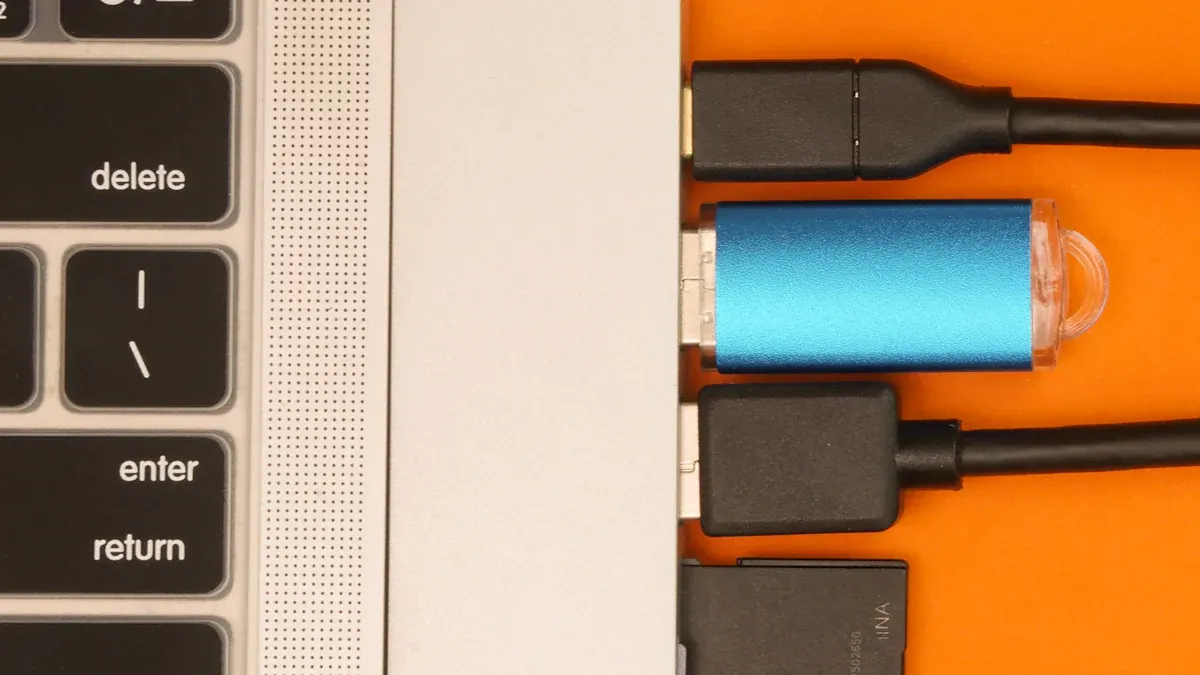
When you look at different cables, it can get confusing. You might wonder, “Is this the right one for my device?” Let’s break down how you can spot a usb c cable compared to USB A and Micro USB. You’ll see that each connector has its own look and feel.
USB C vs USB A
You probably see USB A connectors everywhere. They are the classic, chunky rectangles you find on keyboards, mice, and old flash drives. USB A connectors have a flat, rectangular shape. You can only plug them in one way, so you often end up flipping them over to get the right fit. That can get annoying, especially if you’re in a hurry.
USB C connectors look very different. They have a slim, oval shape and are much smaller than USB A. The best part? You can plug them in either way. No more guessing which side is up! This makes them super easy to use, especially for phones and laptops.
Here’s a quick table to help you spot the difference:
Tip: If you see a cable with a chunky, rectangular end, it’s probably USB A. If it’s slim and oval, you’re looking at USB C.
Many usb data cable manufacturers, like Xiamen Evershine Electronic Technology, now focus on making USB C cables because they work with so many modern devices.
USB C vs Micro USB
Micro USB connectors are even smaller than USB A. You might remember them from older Android phones or small gadgets. They have a tiny, trapezoid shape. One side is flat, and the other is angled, so you have to line it up just right. Micro USB only fits one way, and it’s easy to bend or break if you push too hard.
USB C connectors are a big upgrade. They are a bit wider than Micro USB but have a smooth, oval shape. Both sides look the same, so you never have to check which way to plug it in. This makes charging and connecting your devices much easier.
Let’s compare all three:
If you want a cable that’s easy to use and works with the latest devices, go for USB C. Brands like Xiamen Evershine Electronic Technology make high-quality USB C cables that last longer and look better. When you shop for a new cable, check with a trusted usb data cable manufacturer to make sure you get the right one.
Remember: USB C is oval and reversible. USB A is rectangular and one-way. Micro USB is tiny and only fits one way. Spotting the difference gets easier once you know what to look for!
5. Identifying a USB C Cable
Key Visual Clues
Spotting a USB C cable in your collection can feel tricky, but you can make it easy by looking for a few key clues:
Shape and Size
The connector has a small, oval shape. Both sides look the same, so you never have to flip it over. If you see a cable with a rectangular or trapezoid end, it’s not USB C.Reversible Design
You can plug it in either way. No up or down. If you try this with another cable and it doesn’t work, it’s probably not USB C.Color and Logos
Some USB C cables have special colors or logos that show their speed or power. For example, blue or teal means faster data transfer. Look for icons like a lightning bolt (for Power Delivery) or a “D” for DisplayPort. These marks help you know what your cable can do.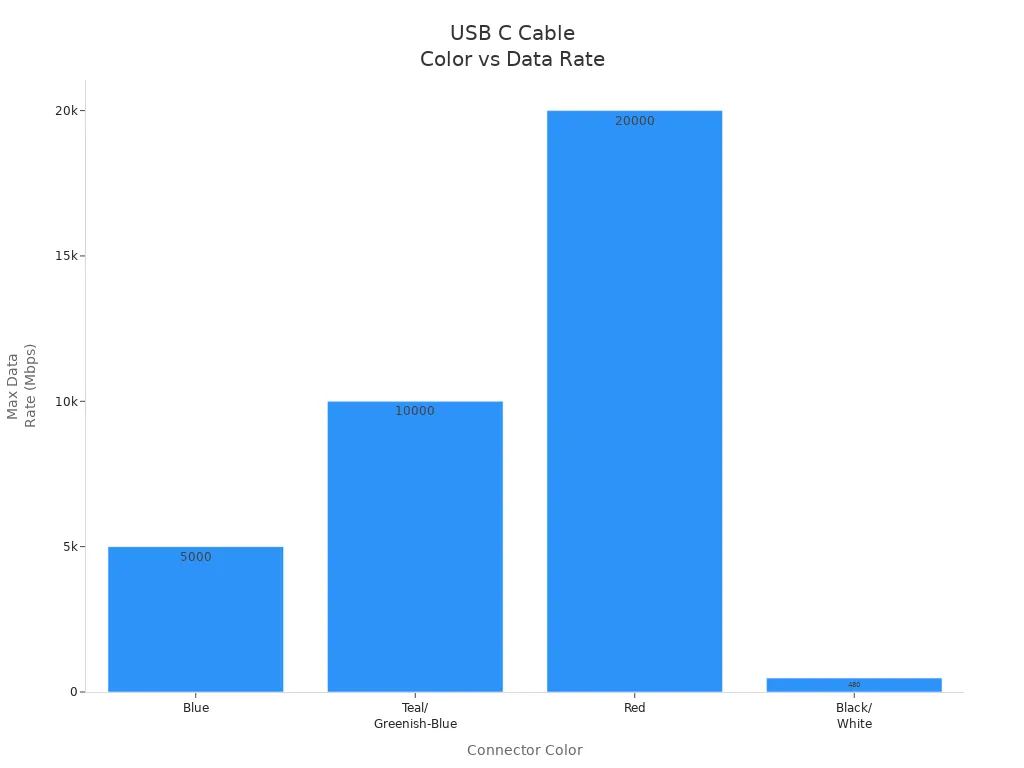
Check for Logos
Many cables have logos set by USB-IF. These marks tell you the USB generation and help you pick the right cable for your device. Always check the product or packaging for these symbols.Cable Type Table
Here’s a quick guide to what you might find:
Tip: If you want the best experience, choose cables from a trusted usb data cable manufacturer like Xiamen Evershine Electronic Technology. They often include clear logos and use high-quality materials.
Common Mistakes
You’re not alone if you mix up USB C with other cables. Here are some common mistakes people make:
Many people think all Micro USB cables can transfer data. Some only charge your device.
Some users look for the USB “trident” icon to check if a cable can transfer data. Not all cables have this icon, but they might still work for data.
People often believe that all cables with the same shape do the same job. That’s not true.
USB-C refers only to the connector’s physical shape, not its internal capabilities. While standards exist, compliance is voluntary, allowing manufacturers to produce cables with wildly varying specs. A staggering number of cables — often the cheapest ones flooding online marketplaces — are 'charging-only,' lacking the wiring for data transfer.
You might think every USB C cable works for everything. In reality, some only charge, while others support fast data or video.
The most common misconception about USB-C yet again stems from the fact that the ports and cables look identical, almost across the board, but this does not mean that they all perform the same function.
If you use the wrong cable, your device might not charge properly or could even overheat. Visual mistakes can lead to using cables that don’t meet power delivery standards. This can cause your device to draw too much current, overheat, or even shut down.
When you shop, always check for trusted brands like Xiamen Evershine Electronic Technology. A good usb data cable manufacturer will clearly label their cables and help you avoid these mistakes.
Note: Look for logos, check the shape, and buy from brands you trust. This way, you’ll always pick the right cable for your needs.
You can spot a usb c cable quickly if you know what to look for. Here’s a simple checklist:
Notice the small, oval, and symmetrical connector.
Check for certifications or speed markings, like the 'SS' symbol or blue color for faster cables.
Remember, you can plug it in either way—no more guessing.
With these tips, you’ll pick the right cable every time!
FAQ
What makes a USB C cable different from other cables?
A USB C cable has a small, oval connector. Both sides look the same. You can plug it in either way. Older cables only fit one way. They look boxy or trapezoid.
Can I use any USB C cable for charging and data transfer?
Some USB C cables only charge your device. Not all can transfer data. Always check the package before you buy. Ask your usb data cable manufacturer for details.
How do I know if my USB C cable is high quality?
Look for strong materials and reinforced ends. Good cables have clear labels. Trusted brands highlight these features. If your cable bends too easily, it may not last.
Why does my USB C cable not fit my old devices?
Old devices use USB A or Micro USB connectors. USB C cables have a different shape and size. You need an adapter or another cable for older gadgets.
Can I use a USB C cable with any brand of device?
Yes, USB C works with most modern devices. You can use it with phones, tablets, and laptops. Just make sure your device has a USB C port.
What should I look for when buying a USB C cable?
Check the connector shape and cable length. Look for features like fast charging or data transfer. Buy from a reliable usb data cable manufacturer. Xiamen Evershine Electronic Technology has many options.
Why do some USB C cables cost more than others?
More expensive cables use better materials. They may have faster speeds or extra features. Trusted brands offer longer-lasting cables.
Can a USB C cable damage my device?
Bad cables can cause slow charging or overheating. Always buy from a good usb data cable manufacturer. Look for safety marks and good reviews.